






How to Troubleshoot Common High Density Rack Cooling Issues: Expert Tips for Optimal Performance
Published:
2026-09-30 14:31
Source:
How to Troubleshoot Common High Density Rack Cooling Issues
Table of Contents
- Understanding High Density Rack Cooling
- Signs of Cooling Issues in High Density Racks
- Common Causes of Cooling Issues
- Step-by-Step Troubleshooting Guide
- Best Practices for Preventive Maintenance
- Optimizing Your Cooling Systems
- Technology Advancements in Cooling Solutions
- Frequently Asked Questions
- Conclusion
Understanding High Density Rack Cooling
High-density racks are essential in modern data centers, housing numerous servers and network devices within a compact space. This efficiency, however, comes with significant challenges, particularly concerning heat management and cooling. High-density environments generate considerable heat, which must be effectively managed to prevent equipment failure and maintain optimal performance. Understanding how cooling systems work, and what they require in terms of maintenance and troubleshooting, is critical for any data center operator.
Signs of Cooling Issues in High Density Racks
Recognizing the early signs of cooling issues can save your equipment from irreversible damage. Here are some key indicators that your cooling system may be struggling:
Increased Equipment Temperature
If server temperatures consistently exceed manufacturer specifications, your cooling system is likely compromised. Regular monitoring of temperature readings is crucial.
Frequent Server Reboots or Failures
Unexpected server reboots may indicate overheating. Servers may shut down to protect their internal components from heat damage.
High Humidity Levels
While cooling systems are designed to reduce temperature, they must also maintain proper humidity levels. Elevated humidity can lead to condensation and corrosion of hardware components.
Common Causes of Cooling Issues
Understanding the underlying causes of cooling problems is the first step toward effective troubleshooting.
Inadequate Airflow
Improper airflow is one of the primary reasons cooling systems fail. Blocked vents, poorly placed equipment, and overcrowded racks can significantly impede airflow.
Failure of Cooling Equipment
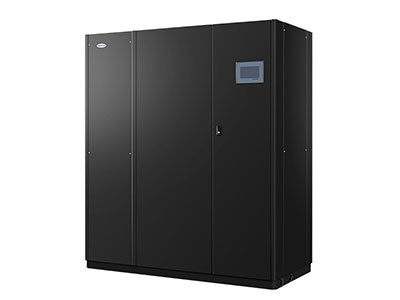
Cooling systems, including CRAC units (Computer Room Air Conditioning), may break down due to age, lack of maintenance, or electrical issues. Regular checks of all cooling components are essential.
Improper Rack Layout
The layout of your racks can dramatically affect cooling efficiency. Hot and cold aisle configurations are important in ensuring that cool air reaches the equipment effectively.
Step-by-Step Troubleshooting Guide
When cooling issues arise, follow these steps to diagnose and resolve potential problems.
Step 1: Conduct a Physical Inspection
Begin with a physical inspection of your equipment and cooling system. Check for dust accumulation, blocked vents, and any visible damage to cooling units.
Step 2: Monitor Temperature and Humidity
Use monitoring tools to assess the temperature and humidity levels in the data center. Look for any anomalies that could indicate cooling issues.
Step 3: Evaluate Airflow Patterns
Assess your airflow patterns. Ensure that cold air is directed to the intake vents of the equipment and that hot air is efficiently expelled.
Step 4: Inspect Cooling Equipment Functionality
Check the functionality of your cooling units. Listen for unusual noises and ensure that fans are operating correctly.
Step 5: Adjust Rack Layout as Necessary
If airflow is compromised, consider reconfiguring your rack layout. Implement hot and cold aisle containment strategies where applicable.
Step 6: Schedule Regular Maintenance
Establish a routine maintenance schedule for all cooling equipment. Regular checks can prevent many common issues.
Best Practices for Preventive Maintenance
Preventive maintenance is vital for ensuring the longevity and effectiveness of cooling systems.
Regular Cleaning of Equipment
Dust and debris can obstruct airflow and heat dissipation. Regularly clean both the equipment and the cooling units to ensure optimal operation.
Routine Checks of Airflow and Temperature
Implement a schedule for monitoring airflow and temperature. Use sensors and alarms to alert you of any deviations from the norm.
Monitoring Software
Consider investing in monitoring software that provides real-time data on temperature, humidity, and airflow patterns.
Optimizing Your Cooling Systems
To enhance the efficiency of your cooling systems, consider the following optimization strategies.
Implement Hot and Cold Aisles
Organize your racks to create hot and cold aisles. This method improves cooling efficiency by directing cold air directly to the equipment intake.
Use Advanced Cooling Technologies
Explore the use of advanced cooling technologies, such as in-row cooling or liquid cooling, which can provide more targeted cooling solutions.
Regularly Update Equipment
Ensure that your cooling systems and hardware are up-to-date. Outdated equipment may not efficiently manage heat production in modern high-density environments.
Technology Advancements in Cooling Solutions
The landscape of cooling technology is rapidly evolving. Staying informed about the latest advancements can help you maintain optimal performance.
Liquid Cooling Solutions
Liquid cooling systems offer efficient heat removal capabilities, especially in high-density environments. They can significantly reduce the amount of energy required for cooling.
Smart Monitoring Systems
Smart monitoring systems provide real-time analytics and predictive maintenance capabilities, allowing for proactive measures to be taken before issues arise.
Energy Efficient Cooling Units
Consider upgrading to energy-efficient cooling units that can provide substantial savings in energy costs while maintaining effective cooling performance.
Frequently Asked Questions
What are the signs that my cooling system needs maintenance?
Signs include elevated temperatures, frequent server failures, and visible dust or debris accumulation.
How can I improve airflow in my data center?
Improving airflow can be achieved by organizing equipment into hot and cold aisles, removing obstructions, and utilizing airflow management accessories.
When should I consider upgrading my cooling system?
Consider upgrading if your current system struggles to maintain optimal temperatures, is outdated, or if you are increasing equipment density.
What is the best way to monitor temperature and humidity?
Utilize environmental monitoring systems that provide real-time data and alerts for temperature and humidity fluctuations.
How often should I perform maintenance on my cooling systems?
Routine maintenance should be scheduled at least quarterly, with more frequent checks as necessary based on equipment load and environmental factors.
Conclusion
Troubleshooting cooling issues in high-density racks is essential for maintaining the health of your network hardware and ensuring optimal performance. By understanding the signs of potential problems, identifying common causes, and following a structured troubleshooting process, we can effectively address cooling challenges. Implementing best practices for preventive maintenance and staying informed about advancements in cooling technology will not only enhance your current cooling systems but also prepare your data center for future demands. Through proactive measures and strategic optimizations, we can ensure reliable, efficient, and sustainable cooling solutions for our high-density environments.
Related news
Harnessing the Power of Liquid: A Comprehensive Exploration of CDU Cooling Systems
Harnessing the Power of Liquid: A Comprehensive Exploration of CDU Cooling Systems Table of Contents Introduction to CDU Cooling Systems Understanding Cooling Technology in Computing What is a CDU? Components of a CDU Cooling System Advantages of CDU Cooling Systems Challenges and Considerations in CDU Cooling Applications of CDU Cooling Systems in Industry The Fut
Unlocking the Future: Insights into AI Computing Infrastructure Solutions
As industries rapidly evolve towards more data-centric and AI-driven operations, the significance of AI computing infrastructure solutions has become increasingly vital. These solutions are designed to support the deployment and management of artificial intelligence applications, enabling organizations to harness data more effectively and achieve greater efficiencies. At the core of AI computing i
The Relationship Between High Density Rack Cooling and Hardware Lifespan In today’s rapidly evolving digital landscape, ensuring the longevity of network hardware is crucial for any organization. High-density rack cooling is not just a luxury; it is a necessity for maintaining optimal performance and extending the lifespan of your critical hardware. This article delves into the various aspects of
Understanding Liquid-Cooled Server Racks: A Comprehensive Guide
Liquid-cooled server racks represent a significant advancement in the field of data center cooling solutions, offering numerous benefits over traditional air cooling methods. In today’s digital age, where the demand for processing power and storage capacity continues to soar, maintaining optimal temperatures within server environments is crucial. This is where liquid cooling technology comes into
Comparing Air vs. Liquid Cooling for Server Racks: Which System Reigns Supreme?
Comparing Air vs. Liquid Cooling for Server Racks: Which System Reigns Supreme? Table of Contents Introduction to Server Cooling Solutions The Importance of Effective Cooling in Data Centers Understanding Air Cooling Systems Exploring Liquid Cooling Systems Comparing Efficiency: Air vs. Liquid Cooling Cost Analysis of Air and Liquid Cooling Systems Installation and Maintenance Con
Revolutionizing Efficiency: The Importance of AI Server Cooling Systems
As technological advancements continue to accelerate, servers are becoming increasingly powerful, capable of processing vast amounts of data at unprecedented speeds. However, with this surge in performance comes the challenge of heat management. Overheating can lead to hardware failures, reduced efficiency, and increased operational costs. This is where AI server cooling systems come into play, of

Copyright Clarify:
copyright ownership belongs to Hairf Company, shall not be reproduced, copied,or used in other ways without permission.Otherwise, Hairf Company will have the right to pursue legal responsibilities.
Serial NO.:HFSZC171008

+86 13910733790
East of Huishan Road, Shuangfeng Development Zone,Hefei City, Anhui Province, China
ONLINE MESSAGES
copyright © 2022 Hairf Company


